Kea
This section aims to explain the design and implementation of the core controller class Kea in Kea.
Functional Design and Implementation
The Kea class is the core class of the tool, serving as the controller for functionality related to property-based testing. In the Kea class, the main stored contents and exposed methods are:
Methods for loading all KeaTests and reading them into KeaTestElements.
Storage of all user-defined KeaTestElements, as well as methods to access these property-related functions (initializer, rule, mainPath).
Storage of the currently running PDL driver (including Android and HarmonyOS) and methods to set the PDL driver to be run.
The property precondition checker method returns the properties that have passed the preconditions in the current application interface.
Method to execute an interactive scenario of a property.
Method to execute main path steps.
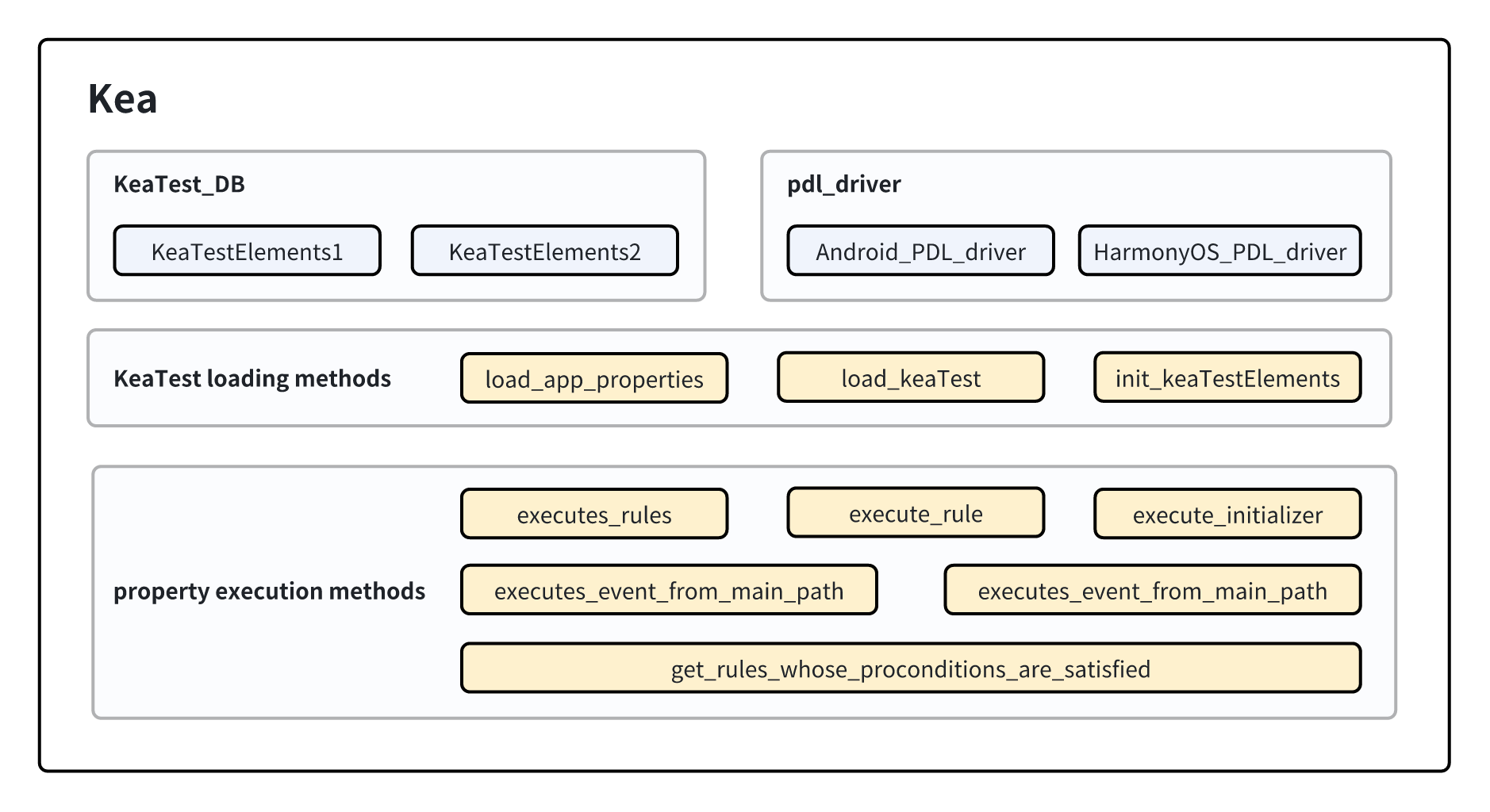
Composition of the Kea Class
Implementation of Data Structures in the Kea Class
KeaTest_DB
KeaTest_DB is the database at runtime for Kea, used to store all user-defined properties. Each data item is stored as a key-value pair of <keaTest, keaTestElements>.
pdl_driver
The pdl_driver stores the current PDL (Property Description Language) driver. Here, it stores the driver for HarmonyOS or Android devices, mainly used to execute a certain step in the main path.
Implementation of Member Methods in the Kea Class
Methods for Reading Properties
Methods related to reading properties primarily provide external access to read user-defined properties. These properties are organized in the format of the KeaTestElements data structure after being read, and then stored in KeaTest_DB.
load_app_properties
load_app_properties reads properties from a user-specified properties file and stores them into Kea. Its core process is as follows.
1. 去除重复指定的文件。
2. 对每个文件,检查文件的后缀名是否为.py以确认文件有效性。
3. 通过导入模块的方式导入用户定义的性质。
4. 为模块设置对应的系统的pdl_driver。
5. 检查在步骤3中获得的模块的成员,识别其中的用户定义性质(KeaTest的子类对象)并调用load_KeaTest方法加载他们。
6. 回到步骤2直至所有用户自定义文件被加载完毕。
The simplified Python-style code for the specific steps is as follows:
Note: For clarity, the simplified code abstracts and displays only the core process, and the actual code may not completely align with the simplified reference code. The same rules will apply to other simplified codes presented later.
- Parameters:
property_files:List[str]: List of file paths for user-defined properties.
- Return:
None
@classmethod
def load_app_properties(cls, property_files):

    remove_duplicated_files(property_files)

    for file in property_files:

        check_file_basename(file)

        module = get_module_name(file)

        try:
            module = importlib.import_module(module_name)

            # set the pdl driver in the modules
            module.d = cls._pdl_driver

            # find all kea tests in the module. Load them.
            for obj in getmembers(module):
                if is_subclass(obj, KeaTest):
                    cls.load_KeaTest(obj)
load_KeaTest
load_KeaTest retrieves user-defined properties (including initializer function objects, interactive scenarios, main path function objects) from KeaTest, converting them into the KeaTestElements data structure and storing them in KeaTest_DB.
The process of load_KeaTest is as follows:
1. 初始化一个KeaTestElements,以 <KeaTest, KeaTestElements> 数据项的方式存储进KeaTest_DB
2. 调用KeaTestElements的方法读取KeaTest中的性质,并存储进KeaTestElements。
Its implementation is shown in the following simplified Python code:
- Parameters:
keaTest:KeaTest: User-defined property keaTest object.
- Return:
keaTestElements:KeaTestElements: The KeaTestElements object read from the keaTest object.
@classmethod
def init_KeaTestElements(cls, keaTest):

    keaTest_name = get_keaTest_name(keaTest)
    keaTestElements = KeaTestElements(keaTest_name)
    KeaTest_DB.add_item(keaTest, KeaTestElements)
    return keaTestElements


@classmethod
def load_KeaTest(cls, keaTest):

    keaTestElements = cls.init_KeaTestElements(keaTest)
    keaTestElements.load_initializers(keaTest)
    keaTestElements.load_rules(keaTest)
    keaTestElements.load_mainPaths(keaTest)
Methods Related to Property Execution
Methods related to property execution mainly provide interfaces for functionalities associated with property execution, primarily called through input strategies. For example, to get properties that pass the preconditions in the current page, execute an interactive scenario of a property, etc.
execute_rules
For a group of rules (properties), randomly select a property and call the execute_rule method to attempt execution.
The defined implementation in simplified Python style is as follows.
- Parameters:
rules:List[Rule]: List of property interactive scenarios.
- Return:
Execution Result
def execute_rules(rules):

    if rules is empty:
        return CHECK_RESULT.PRECON_NOT_SATISFIED
    rule_to_check = random.choice(rules)
    execute_rule(rule_to_check)
execute_rule
For a rule (property), execute it and return the execution result. The returned result CHECK_RESULT is a struct constant, which has five return situations and their meanings as follows:
1. PRECOND_NOT_SATISFIED  前置条件不满足,一般由于页面不稳定引起
2. Ui_NOT_FOUND           找不到执行过程中某一步骤的控件
3. ASSERTION_FAILURE      断言(后置条件)失败,找到疑似应用错误
4. UNKNOWN_EXECPTION      未知的错误
5. PASS                   断言(后置条件)成功,性质通过
Its implementation in simplified Python style is as follows.
- Parameters:
rules:List[Rule]: List of property interactive scenarios.
- Return:
CHECK_RESULT: Execution Result
def execute_rule(rule, keaTest):

    if precondition_satisfied(rule) == False:
        return CHECK_RESULT.PRECON_NOT_SATISFIED
    try:
        execute(rule.function(keaTest))
    except UiObjectNotFoundError:
        return CHECK_RESULT.UI_NOT_FOUND
    except AssertionError:
        return CHECK_RESULT.ASSERTION_FAILURE
    except Exception:
        return CHECK_RESULT.UNKNOWN_EXECPTION

    return CHECK_RESULT.PASS
get_rules_whose_preconditions_are_satisfied
For a group of properties, check their preconditions and get the properties that pass the preconditions.
The simplified Python code is as follows:
- Parameters:
None
- Return:
rules_passed_precondition:Dict[Rule, KeaTest]: List of properties that have passed the preconditions.
def get_rules_whose_preconditions_are_satisfied():

    for keaTestElements in KeaTest_DB:
        for target_rule in keaTestElements:
            if pass_precondition(target_rule) == True
                rules_passed_precondition.add(target_rule)

    return rules_passed_precondition
get_rules_without_precondition
For a group of properties, if they have no preconditions, retrieve those properties without preconditions.
Note
Properties without preconditions are regarded as unconditional execution, equivalent to the preconditions always holding true.
The simplified Python code is as follows:
- Parameters:
None
- Return:
rules_passed_precondition:Dict[Rule, KeaTest]: List of properties without preconditions.
def get_rules_without_preconditions(self):

    for eaTestElements in KeaTest_DB:
        for target_rule in keaTestElements.rules:
            if len(target_rule.preconditions) == 0:
                rules_without_precondition.add(target_rule)
    return rules_without_precondition
execute_event_from_main_path
For a given source code of a main path step, attempt to execute it. Since the main path consists of steps written by the user using the PDL driver, it is necessary to obtain the driver object and allow it to execute the corresponding operations. The driver is stored in the previously mentioned data structure’s pdl_driver.
The Python code is as follows.
- Parameters:
executable_script:str: Executable source code of the main path step.
- Return:
None
def execute_event_from_main_path(self, executable_script):
    d = self._pdl_driver
    exec(executable_script)