HMDroidbot
HMDroidbot is a class for interaction with Android devices during the application exploration phase of Kea. It mainly provides methods for generating events, taking screenshots, etc. HMDroidbot also provides a UTG (UI Transition Graph) that can be used to create more advanced application exploration strategies based on property-based testing (MBT, Model Based Testing).
Note
HMDroidbot is part of the work for this project, developed by team member Liang Xixian, with the reference project being droidbot and should be counted as part of this project.
HMDroidbot Project Architecture
The components of the HMDroidbot project architecture include:
AppHM: Used to parse HarmonyOS application installation packages (.hap) or Harmony packages. Provides information such as EntryAbility.
DeviceHM: An abstraction of a HarmonyOS device, providing some operational interfaces at the device level, such as sending files, inputting content, rotating the device, and retrieving the foreground application.
HDC: An abstraction of HarmonyOS device hdc commands, providing interfaces for interacting with the device via hdc, such as shell and pull_file. DeviceHM depends on this class.
Dumper: An abstract class for obtaining the layout of the interface of a HarmonyOS device, on which HDC depends.
hmdriver2: A testing tool for HarmonyOS devices, extending DeviceHM to provide functionalities such as input events.
InputManager: An input controller that provides functionalities such as strategy selection.
InputPolicy: Input strategies providing various input strategies, such as random strategies, large model guidance strategies, etc., used to define the exploration rules for applications.
EventLog: An abstraction of the event log that records operations before and after event input, as well as operations for sending events.
InputEvent: A class for input events, including click, long press, input events, etc.
UTG: A class for the UI Transition Graph, used for application modeling, can be used by input strategies for more complex decision-making.
DeviceState: A class for the abstraction of the application interface, providing different levels of abstraction to the UTG class for modeling.
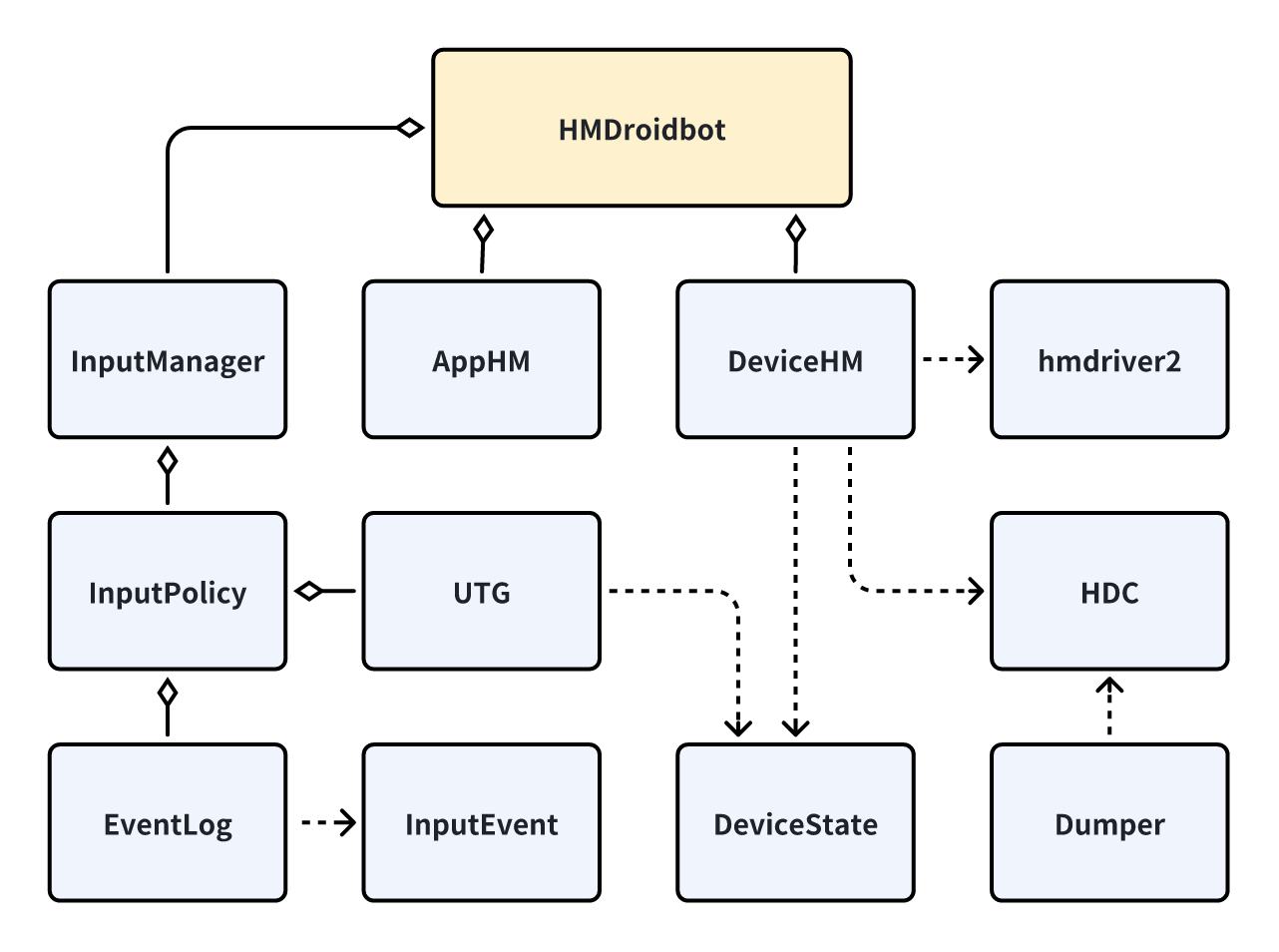
HMDroidbot Project Architecture Diagram
Since InputManager, InputPolicy, and Kea’s input strategies are closely related, a separate section will be introduced. hmdriver2 is a reference framework and has not been modified for development. The following introduces other components apart from the aforementioned three functions. Among them, EventLog, InputEvent, and UTG essentially reuse droidbot.
AppHM
AppHM is an abstraction of a HarmonyOS application, used to analyze a HarmonyOS application. It provides external methods for analyzing HarmonyOS applications and obtaining application entry (EntryAbility) information.
AppHM will choose the appropriate initialization method based on whether the passed application is an installation package (.hap) or a package name (e.g., com.example.app).
def __init__(self):

    if app_name is a installation package file:
        self._hap_init()
    elif app_name is a package name:
        self._package_init()
The following are the methods and documentation for AppHM:
Methods |
Input |
Output |
Introduction |
|---|---|---|---|
hap_init |
app_path:str |
Given a path to an installation package, initialize the app using the package. |
|
load_hap_info |
pack_info:Dict |
Decompress the installation package and read the information inside. |
|
package_init |
package_name:str |
Initialize the app using the package name. |
|
dumpsys_package_info |
package_info:Dict |
Obtain package information from the dumpsys command. |
|
get_package_name |
package_name:str |
Get the app package name. |
|
get_start_intent |
start_intent:Intent |
Get the Intent to start the application. |
|
get_stop_intent |
start_intent:Intent |
Get the Intent to stop the application. |
|
get_hashes |
hashes:List[str] |
Get the hash of the application installation package. |
DeviceHM
DeviceHM is an abstraction of a HarmonyOS device, providing some operational interfaces at the device level, such as sending files, inputting content, rotating the device, and retrieving the foreground application.
The following are the methods and documentation for DeviceHM.
Note
Device adapters are the adapters for interaction between the terminal and the application, and DeviceHM can interact with the terminal through various tools, such as HDC, hmdriver2, etc.
Methods |
Input |
Output |
Introduction |
|---|---|---|---|
check_connectivity |
Check whether the device and device adapters are available. |
||
set_up |
Initialize the device and device adapters. |
||
connect |
Connect the device and device adapters. |
||
disconnect |
Disconnect the device and device adapters. |
||
is_foreground |
app:AppHM |
Boolean |
Check whether a certain application is in the foreground state on the device. |
model_number |
model_number:str |
Get the device number of the device. |
|
device_name |
device_name:str |
Get the device name. |
|
get_release_version |
sdk_api:str |
Get the SDK API version of the device. |
|
get_display_info |
display_info:Dict |
Get the resolution of the device. |
|
get_width |
width:str |
Get the horizontal resolution of the device. |
|
get_height |
height:str |
Get the vertical resolution of the device. |
|
unlock |
Unlock the device. |
||
send_intent |
intent:Intent |
Send an Intent to the device. |
|
send_event |
event:InputEvent |
Send an event to the device. |
|
start_app |
app:AppHM |
Start an application. |
|
get_top_activity_name |
top_ability_name |
Get the top Ability name of the device. |
|
get_current_activity_stack |
current_ability_stack:List[str] |
Get the Ability stack of the device. |
|
install_app |
app:AppHM |
Install an application. |
|
uninstall_app |
app:AppHM |
Uninstall an application. |
|
push_file |
local_file:Path, remote_dir:Path |
Push a file to the device. |
|
pull_file |
remote_file:Path, local_file:Path |
Pull a file from the device. |
|
take_screenshot |
Take a screenshot of the device. |
||
get_current_state |
action_count:int |
current_state:DeviceState |
Get the current state abstraction of the device. |
view_touch |
x:int, y:int |
Perform a click operation based on the coordinates. |
|
view_long_touch |
x:int, y:int, duration:float |
Perform a long press operation based on the coordinates. |
|
view_drag |
start_xy:List[int], end_xy:List[int], duration:float |
Perform a drag operation based on the coordinates. |
|
view_append_text |
text:str |
Append a text. |
|
view_set_text |
text:str |
Set a text. |
|
key_press |
key_code |
Input an event based on the event code. |
|
get_views |
get_views |
Get the controls on the current device. |
|
get_random_port |
port:int |
Get a random available port. |
HDC
HDC: An abstraction of HarmonyOS device hdc commands, providing interfaces for interacting with the device via hdc, such as shell and pull_file. DeviceHM depends on this class.
The HarmonyOS device obtains the application’s interface through the Dumper class. The Dumper class is an abstract class with two implementations: UitestDumper and HiDumper.
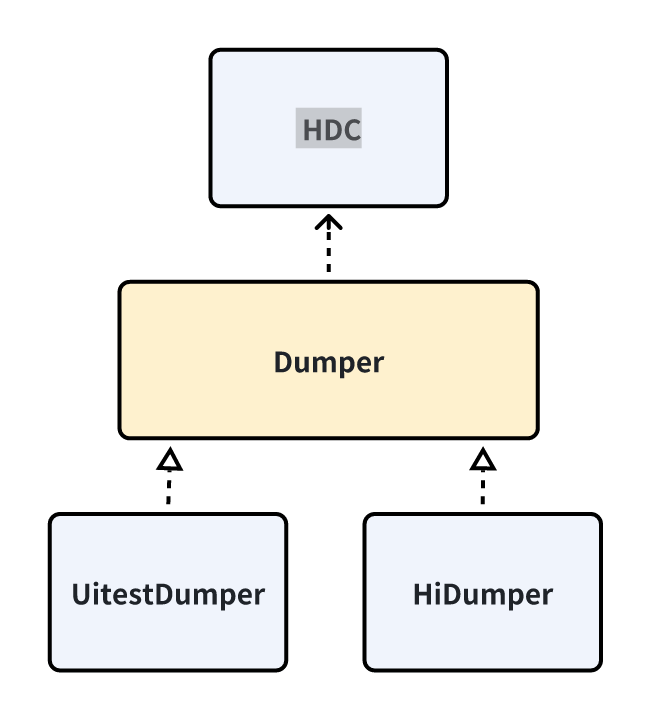
Diagram of the relationship between Dumper class and HDC class.
The following are the methods and documentation for HDC.
Methods |
Input |
Output |
Introduction |
|---|---|---|---|
set_up |
Initialize HDC. |
||
run_cmd |
Execute a hdc command line command. |
||
shell |
Execute a hdc shell command line command. |
||
connect |
Connect to HDC. |
||
disconnect |
Disconnect HDC. |
||
check_connectivity |
Check if HDC is available. |
||
get_property |
property_name |
property |
Get the device’s properties through hdc. |
get_model_number |
model_number:str |
Get the device’s model number. |
|
get_sdk_version |
sdk_version:str |
Get the SDK version. |
|
get_device_name |
Get the device name. |
||
get_installed_apps |
installed_apps:List[str] |
Get the installed applications. |
|
get_display_density |
dpi:str |
Get the display dpi of the device. |
|
unlock |
Unlock the device through hdc. |
||
touch |
x:int, y:int |
Perform a click operation based on the coordinates through hdc. |
|
long_touch |
x:int, y:int, duration:float |
Perform a long press operation based on the coordinates through hdc. |
|
drag |
start_xy:List[int], end_xy:List[int], duration:float |
Perform a drag operation based on the coordinates through hdc. |
|
type |
text:str |
Add a text through hdc. |
|
press |
key_code |
Input an event based on the event code through hdc. |
|
push_file |
local_file:Path, remote_dir:Path |
Push a file to the device via hdc. |
|
pull_file |
remote_file:Path, local_file:Path |
Pull a file from the device via hdc. |
|
get_views |
output_dir |
Get the controls on the current page. |
Dumper mainly obtains the layout of the current page from the device and converts it into an Android style for use by droidbot.
The following are the implementations of UiTestDumper:
Methods |
Input |
Output |
Introduction |
|---|---|---|---|
dump_view |
view_path |
Obtain layout json through uitest and return. |
|
preprocess_views |
views_path |
Process views and convert them into a bi-directional query tree structure. |
|
get_adb_view |
raw_view:Dict |
Process views and convert them into an Android style for easy use by droidbot. |
|
get_view |
views:Dict |
Get the views. |
The following are the implementations of HiDumper:
Methods |
Input |
Output |
Introduction |
|---|---|---|---|
get_focus_window |
focus_window |
Get the current foreground window. |
|
dump_target_window_to_file |
focus_window:int, fp:IO |
Dump the layout of the target window into a file. |
|
dump_layout |
fp:IO |
Process the layout output from HiDumper into a tree structure. |
|
adapt_hierarchy |
Process layout into Android style. |
||
“get_views” |
views:Dict |
Get the views. |
InputEvent
InputEvent is an abstract class, and all other events are implemented on this abstract interface.
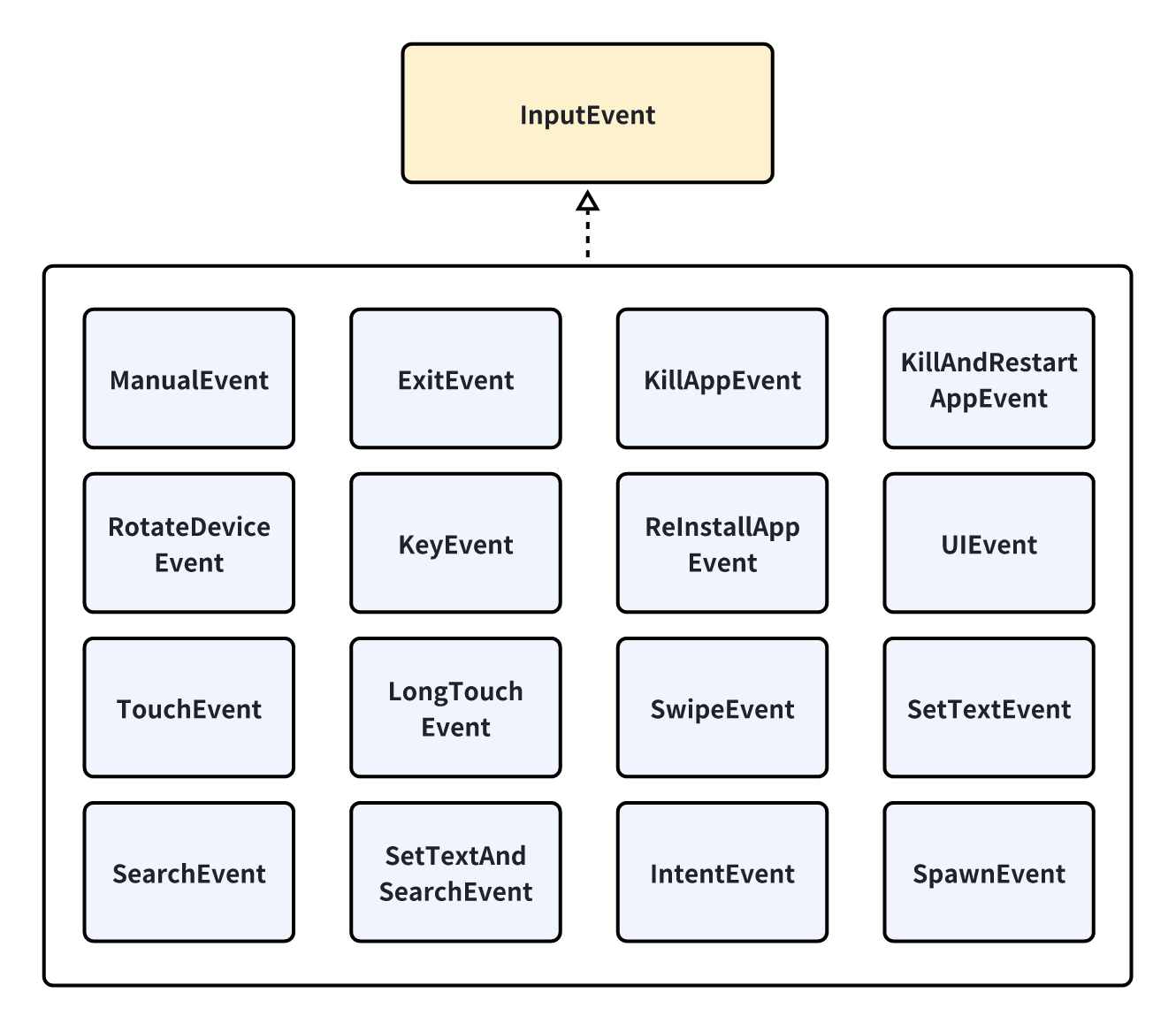
InputEvent interface and its implementations.
The following are the methods of the InputEvent abstract class:
Methods |
Input |
Output |
Introduction |
|---|---|---|---|
send |
device:HMDevice |
Send an event to the device. |
|
to_dict |
event_dict:Dict |
Save the current event in dictionary form. |
|
from_dict |
event_dict:Dict |
event:InputEvent |
Get an InputEvent instance by parsing from a dictionary. |
get_event_str |
state:DeviceState |
event_str:str |
Get the event representation based on the current state. |
get_views |
views:List[str] |
Get the views corresponding to the current event. |
UTG
A class for the UI Transition Graph, used for application modeling, can be utilized by input strategies for more complex decision-making.
The following are the methods and documentation for UTG.
Methods |
Input |
Output |
Introduction |
|---|---|---|---|
first_state_str |
state_str:str |
The state hash of the first event. |
|
last_state_str |
state_str:str |
The state hash of the last event. |
|
effective_event_count |
count:int |
The number of events that caused the transition. |
|
nums_transitions |
count:int |
The number of discovered state transitions. |
|
clear_graph |
Clear the UTG. |
||
add_transition |
event:InputEvent, old_state:str, new_state:str |
Add a transition. |
|
remove_transition |
event:InputEvent, old_state:str, new_state:str |
Remove a transition. |
|
add_node |
state:DeviceState, event:InputEvent |
Add a state node. |
|
is_event_explored |
event:InputEvent, state:str |
Boolean |
Determine whether an event has been explored. |
is_state_reached |
state:str |
Boolean |
Determine whether a state has been reached. |
get_reachable_states |
current_state:str |
reachable_states:List[str] |
Get the states reachable from the current state. |
reachable_from_one_state_to_another |
from_state:str, to_state:str |
Boolean |
Determine whether two states are reachable. |
get_navigation_steps |
from_state:str, to_state:str |
List[Tuple[str, InputEvent]] |
Get the steps to navigate from one node to another. |
find_activity_according_to_state_str |
state_str:str |
Get the Ability corresponding to the state based on its hash. |
DeviceState
DeviceState is a class used for the abstraction of the application interface, providing different levels of abstraction for modeling with the UTG class.
The following are the methods and documentation for DeviceState.
Methods |
Input |
Output |
Introduction |
|---|---|---|---|
get_possible_input |
possible_input:List[InputEvent] |
Get the events executable on the current state. |
|
get_text_representation |
state_desc:str, activity:str, indexed_views:List[str] |
Get the description of the current state. |
|
get_view_by_attribute |
attribute_dict:Dict, random_select:Bool |
Get available controls based on attributes. |
|
is_view_exist |
view_dict:Dict |
Boolean |
Determine whether a certain control exists. |
get_view_desc |
view:Dict |
view_desc:str |
Get the description of the control. |
assemble_view_tree |
root_view:Dict, views:List[Dict] |
Organize the view into a tree structure. |
|
get_view_str |
view:Dict |
view_str:str |
Get the description of a view. |
get_pagePath |
pagePath:str |
Get the pagePath corresponding to the current interface. |
|
get_state_str_raw |
state_str_raw:str |
Get the state description of the current page. |
|
get_state_str |
state_str:str |
Get the state hash of the current page. |
|
get_content_free_state_str |
content_free_str:str |
Get the structure hash of the current page. |
|
save_view_img |
view_dict:Dict, output_dir:str |
Save a screenshot of the control. |