LLMPolicy
The LLMPolicy class is the core class that generates input events using LLM (Large Language Model) when UI traps are detected. It is mainly responsible for using LLM to generate input events to enhance functional scenario coverage when encountering UI states that are difficult to explore in the application state space. This class provides a complete event generation process for LLM-assisted event generation strategies. The main methods included in LLMPolicy are:
Generate an LLM-assisted random event based on the current state.
Restart or reinstall the application based on the configuration.
Decide whether to check properties based on randomness, provided that preconditions are met.
Introduction to LLM-assisted event generation strategy
The LLM-assisted event generation strategy is a strategy that combines large language models, which can utilize LLM to generate more effective input events when encountering states in GUI testing of applications that are difficult to explore through traditional random strategies. This strategy is particularly suitable for scenarios that require in-depth exploration of the application state space or need to optimize test coverage.
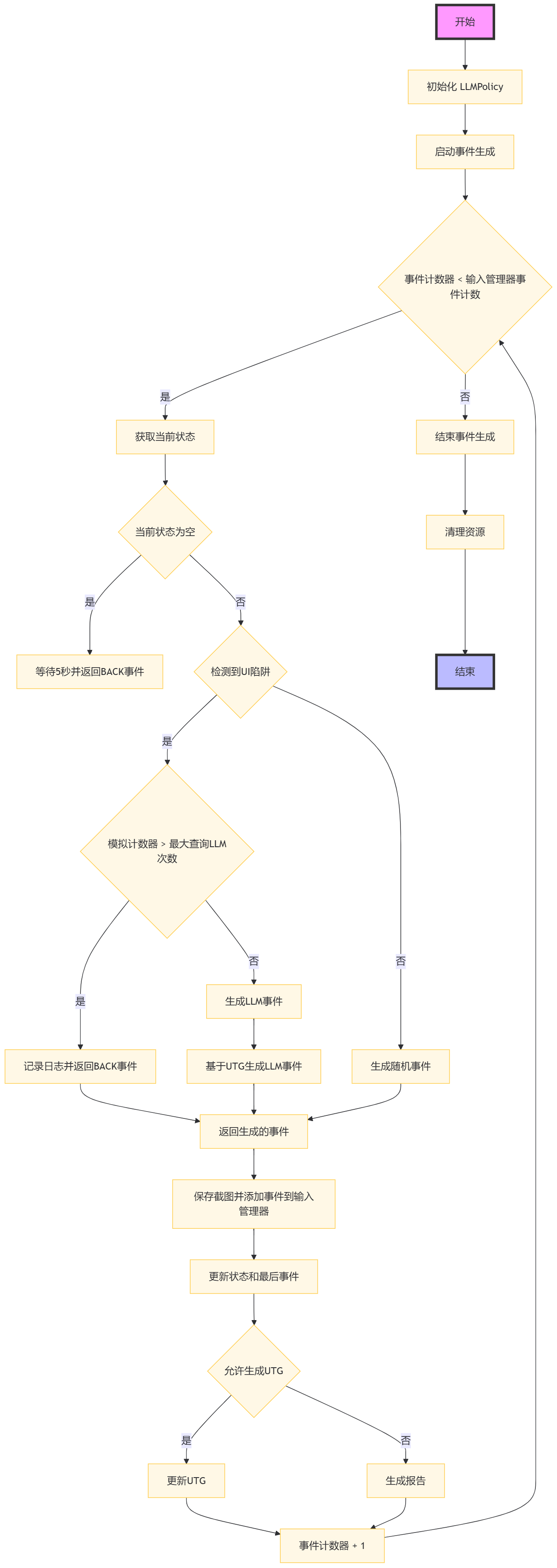
Flowchart of LLM-assisted event generation strategy
The specific execution steps are as follows:
Step 1: Begin the event generation process of the LLMPolicy class.
Step 2: Initialize the LLMPolicy instance, set up the logger, action history, etc.
Step 3: Start the event generation loop until the input manager’s event count ends or conditions are no longer met.
Step 4: Check if the event counter is less than the event count set by the input manager.
Step 5: If the event counter is less than the event count set by the input manager, obtain the current application state.
Step 6: Determine whether the current state is empty.
Step 7: If the current state is empty, wait for 5 seconds and return a key event named “BACK”.
Step 8: If the current state is not empty, check if a UI trap has been detected.
Step 9: If a UI trap is detected, check if the simulation counter exceeds the maximum number of queries to LLM.
Step 10: If the simulation counter exceeds the maximum number of queries to LLM, log the entry and return a key event named “BACK”.
Step 11: If the simulation counter has not exceeded the maximum number of queries to LLM, generate an LLM event.
Step 12: If no UI trap is detected, generate a random event.
Step 13: Generate an LLM event based on the current user-triggered event (UTG).
Step 14: Return the generated event, which will be used for interaction with the application.
Step 15: Save the screenshot and add the generated event to the input manager.
Step 16: Update the current state and last event.
Step 17: Check if generating UTG is allowed.
Step 18: If generating UTG is allowed, update the UTG.
Step 19: Generate a report including all states and triggered bug information.
Step 20: Increment the event counter by 1, go back to Step 4 and continue the loop.
Step 21: If the event counter reaches the event count set by the input manager, end the event generation loop.
Step 22: Clean up resources and end the event generation process of the LLMPolicy class.
Pseudocode for LLM-assisted event generation strategy.
\(\textbf{Algorithm:} LLM-Assisted Event Generation\)
\(\textbf{Input:} None\)
\(\textbf{Output:} Bug Report\)
 1Function LLM_Assisted_Event_Generation(policy_params)
 2    Initialize policy with device, app, kea, and other parameters
 3    Set event_count to 0
 4
 5    While input_manager is enabled and event_count < max_events
 6        If device needs initialization
 7            Perform device initialization
 8
 9        Determine current application state
10        If app is not running
11            Start the app
12        ElseIf app is in background
13            Bring app to foreground
14        Else
15            Generate LLM prompt based on current state and history
16            Query LLM for next action
17            If LLM response indicates action
18                Perform action and update state
19            Else if LLM indicates text input
20                Get text from LLM and perform text input action
21            End If
22        End If
23
24        If event_count is a multiple of restart_threshold
25            Restart the app if necessary
26
27        Save screenshot and add event to input_manager
28        Increment event_count
29    End While
30
31    Generate final bug report if any issues found
32    Clean up policy resources
33End Function
Data Structures in LLMPolicy Class
event_count
event_countInteger, records the number of events that have been generated.
number_of_events_that_restart_app
number_of_events_that_restart_appInteger, records the number of events that need to be generated before restarting the application.
clear_and_restart_app_data_after_100_events
clear_and_restart_app_data_after_100_eventsBoolean, indicates whether to clear and restart application data after 100 events.
restart_app_after_check_property
restart_app_after_check_propertyBoolean, indicates whether to restart the application after checking properties.
_action_history
_action_historyList, records the action history.
_all_action_history
_all_action_historySet, records all action history.
_activity_history
_activity_historySet, records the activity history.
from_state
from_stateObject, records the starting state.
task
taskString, records the task description for the LLM.
Member Methods in LLMPolicy Class
Methods to Start Event Generation
start
The start method is used to initiate the event generation process.
- Parameters:
input_manager: Instance of InputManager.
- Core Process:
Initialize the event counter and input manager.
Loop to generate events until the event count set by the input manager is reached or the conditions are no longer met.
Generate events based on the current state and guidance from LLM.
Add the generated events to the input manager and update device state.
Handle exceptional situations and increment the event counter after each event.
 1 def start(self, input_manager):
 2     self.event_count = 0
 3     self.input_manager = input_manager
 4     while self.event_count < input_manager.event_count:
 5         event = self.generate_event()
 6         self.input_manager.add_event(event)
 7         self.event_count += 1
 8
 9 def generate_event(self):
10     if not self.from_state:
11         self.from_state = self.device.get_current_state()
12     if self.event_count == 0:
13         event = KillAppEvent(app=self.app)
14     elif self.event_count == 1:
15         event = IntentEvent(self.app.get_start_intent())
16     else:
17         event = (self.generate_llm_event()
18                 if input_manager.sim_calculator.detected_ui_tarpit(input_manager)
19                 else self.generate_random_event_based_on_current_state())
20     return event
Methods to Generate LLM Events
generate_llm_event
The generate_llm_event method is used to generate an LLM-assisted event.
- Parameters:
None
- Returns:
Generated event object.
- Core Process:
Check if the initializer needs to run and obtain the current application state.
Decide whether to restart the application or clear and reinstall based on event count and settings.
Check if there are rules that meet the preconditions and decide whether to check properties based on randomness.
Generate LLM-based events.
 1 def generate_llm_event(self):
 2     if self.event_count == START_TO_GENERATE_EVENT_IN_POLICY or isinstance(self.last_event, ReInstallAppEvent):
 3         self.run_initializer()
 4         self.from_state = self.device.get_current_state()
 5     if not self.from_state:
 6         time.sleep(5)
 7         return KeyEvent(name="BACK")
 8
 9     if self.event_count % self.number_of_events_that_restart_app == 0 and self.clear_and_reinstall_app:
10         return ReInstallAppEvent(self.app)
11
12     rules_to_check = self.kea.get_rules_whose_preconditions_are_satisfied()
13     if rules_to_check and random.random() < 0.5:
14         self.check_rule_whose_precondition_are_satisfied()
15         if self.restart_app_after_check_property:
16             return KillAppEvent(self.app)
17
18     event = self.generate_llm_event_based_on_utg()
19
20     if isinstance(event, RotateDevice):
21         event = RotateDeviceToLandscapeEvent() if self.last_rotate_events == RotateDeviceToPortraitEvent() else RotateDeviceToPortraitEvent()
22         self.last_rotate_events = event
23
24     return event
Methods to Generate LLM Events Based on UTG
generate_llm_event_based_on_utg
The generate_llm_event_based_on_utg method is used to generate an LLM-assisted event based on the current UTG.
- Parameters:
None
- Returns:
Generated event object.
- Core Process:
Obtain the current application state.
If the application is not on the active stack, try to launch the application.
If the application is in the active stack but not in the foreground, try to bring it to the foreground.
If the application is in the foreground, choose the next action based on LLM’s guidance.
 1 def generate_llm_event_based_on_utg(self):
 2     current_state = self.from_state
 3     if current_state.get_app_activity_depth(self.app) < 0:
 4         start_app_intent = self.app.get_start_intent()
 5         return IntentEvent(intent=start_app_intent) if not self._event_trace.endswith(EVENT_FLAG_START_APP) else None
 6
 7     elif current_state.get_app_activity_depth(self.app) > 0 and self.__num_steps_outside > MAX_NUM_STEPS_OUTSIDE:
 8         go_back_event = KeyEvent(name="BACK") if self.__num_steps_outside <= MAX_NUM_STEPS_OUTSIDE_KILL else IntentEvent(self.app.get_stop_intent())
 9         return go_back_event
10
11     action, _ = self._get_action_with_LLM(current_state, self.__action_history, self.__activity_history)
12     return action if action else self.__random_explore_action()
13
14 def __random_explore_action(self):
15     if self.__random_explore:
16         return random.choice(self.__all_action_history)
17     # If couldn't find an exploration target, stop the app
18     stop_app_intent = self.app.get_stop_intent()
19     return IntentEvent(intent=stop_app_intent)
Methods to Query LLM
_query_llm
The _query_llm method is used to query LLM to generate events.
- Parameters:
prompt: The prompt text provided to LLM.
model_name: The name of the LLM model used, default is “gpt-3.5-turbo”.
- Returns:
LLM’s response text.
- Core Process:
Set up the LLM client.
Send the prompt text to LLM.
Receive and return LLM’s response.
1 def _query_llm(self, prompt, model_name):
2
3     client = OpenAI()
4     response = client.chat.completions.create(messages=[{"role": "user", "content": prompt}],
5     model=model_name, timeout=30)
6     return response.choices[0].message.content
Methods to Get Actions Interacting with LLM
_get_action_with_LLM
The _get_action_with_LLM method is used to get the next action based on LLM.
- Parameters:
current_state: Current application state.
action_history: Action history.
activity_history: Activity history.
- Returns:
Selected actions and candidate action list.
- Core Process:
Construct prompt text containing task description, current state, and history.
Query LLM and receive a response.
Parse the response to get action index.
Select action based on the index and update the history.
1def _get_action_with_LLM(self, current_state, action_history, activity_history):
2
3     prompt = self._build_prompt(current_state, action_history, activity_history)
4     response = self._query_llm(prompt)
5     action_idx = self._parse_response(response)
6     return self._select_action(action_idx, current_state, action_history, activity_history)