Stateful Testing
Stateful testing is a software testing method that focuses on the behavior and responses of a system in different states. Its principles are based on state management and state transitions, by designing test cases to cover various states and their transitions to ensure the correctness and consistency of the system under different conditions. This method is suitable for applications that need to maintain consistency before and after a state, ensuring that the system operates normally under various states through the design of stateful test cases, thereby enhancing software reliability and user experience.
In mobile applications, certain functionalities can transition from one state to another based on specific inputs or actions. Therefore, additional data structures are needed to support this.
In Kea, when you write properties that require recording state information, you can use stateful testing. For example, when you want to perform file or folder operations on a device, such as creating a file, deleting a file, or renaming a file.
You can write the following code:
_files = Kea.Bundle("files")
The Bundle class includes the following functions:
add(value: str)
Adds a new value to the current Bundle object.
self._files.add(file_name)
delete(value: str)
Removes a value from the current Bundle object.
self._files.delete(selected_file_name)
update(value: str, new_value: str)
Updates the value of value in the current object to new_value.
self._files.update(file_name, new_name)
get_all_data()
This function returns a list of values stored in the current Bundle object.
self._files.get_all_data()
get_random_value(value_len: int = 10)
This function randomly generates a value and returns it. Therefore, you can call it before using the add and update functions.
file_name = self._files.get_random_value()
self._files.add(file_name)
get_random_data()
This function randomly selects a value from the values stored in the current Bundle object and returns it. Therefore, you can call it before using the delete and update functions.
file_name = self._files.get_random_data()
self._files.delete(selected_file_name)
Next is a complete example that demonstrates how to use Kea’s state testing when defining properties. This example will show how state testing is used in the application Amaze, which is a file management application that allows users to operate files or folders on their devices. These properties are defined to test whether there are errors in the data operations of the file system. In this case, stateful testing is crucial; you can use Bundle to store all folders created by Kea and operate on them throughout the testing process.
First, you can define a property called create_file_should_exist. The steps to implement this property are as follows: 1. Return to the main directory. 2. Create a file. 3. Check if the new file exists. This property ensures that the file indeed exists in the expected location after it has been created.
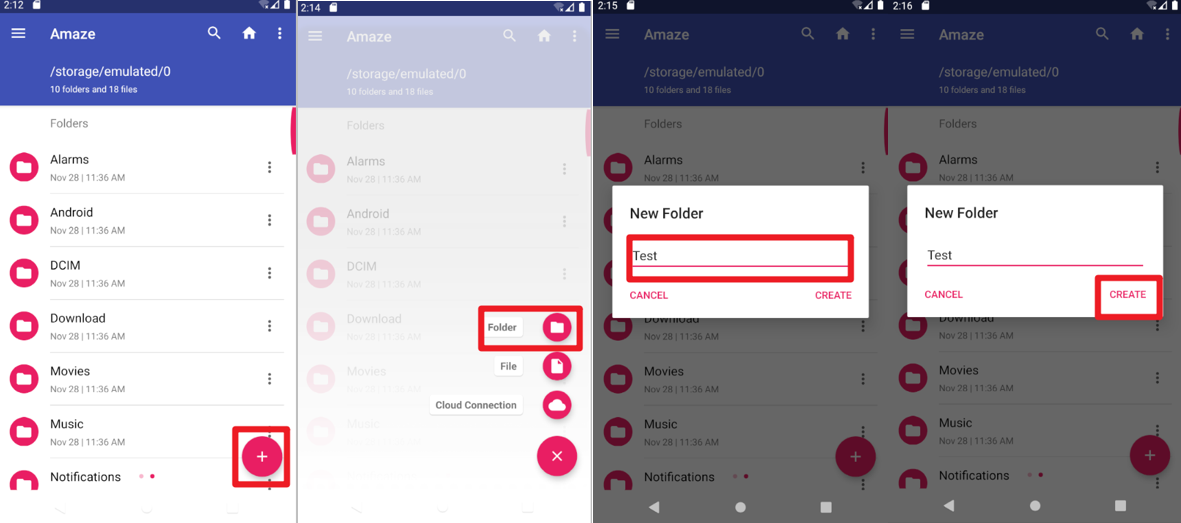
Create Folder Screenshot
@precondition(lambda self: d(resourceId="com.amaze.filemanager:id/sd_main_fab").exists() and
                           not d(textContains = "SDCARD").exists())
@rule()
def create_file_should_exist(self):
    d.swipe_ext("down", scale=0.9)
    d(description="Navigate up").click()
    d(resourceId="com.amaze.filemanager:id/design_menu_item_text", textContains="Internal Storage").click()
    d(resourceId="com.amaze.filemanager:id/sd_main_fab").click()
    d(resourceId="com.amaze.filemanager:id/sd_label", text="Folder").click()
    file_name = self._files.get_random_value()
    d.send_keys(file_name, clear=True)
    d(resourceId="com.amaze.filemanager:id/md_buttonDefaultPositive").click()
    self._files.add(file_name)
    d(scrollable=True).scroll.to(resourceId="com.amaze.filemanager:id/firstline", text=file_name)
    assert d(text=file_name).exists()
Next, you can define a property called change_filename_should_follow. The steps to implement this property are: Return to the main directory, randomly select a file, change its name, and check if the original named file has disappeared and the newly named file exists.
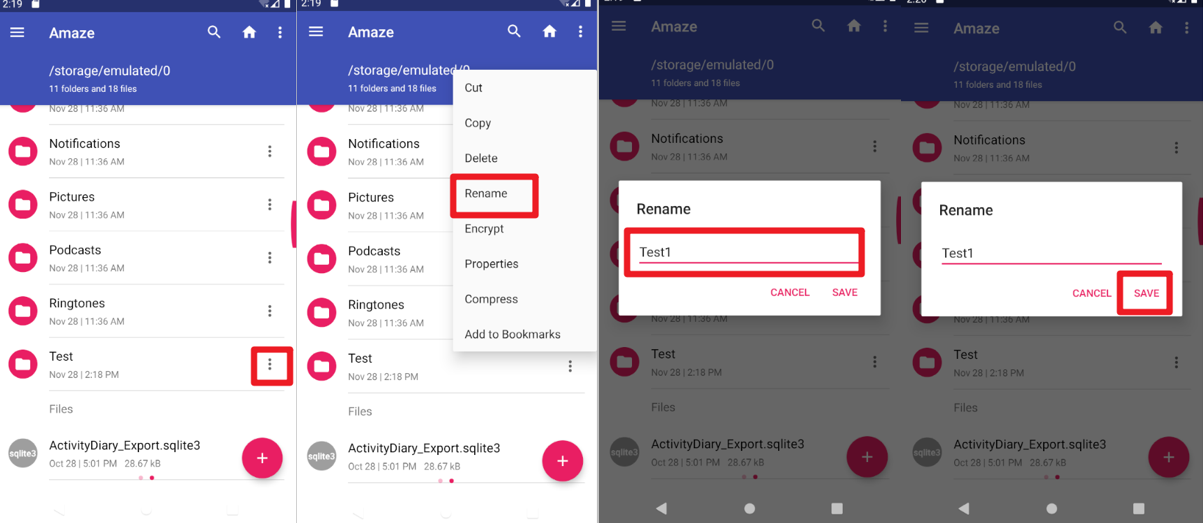
Rename Folder Screenshot
@precondition(lambda self:  self._files.get_all_data() and
                            d(resourceId="com.amaze.filemanager:id/sd_main_fab").exists() and
                            not d(resourceId="com.amaze.filemanager:id/action_mode_close_button").exists())
@rule()
def change_filename_should_follow(self):
    d.swipe_ext("down", scale=0.9)
    d(description="Navigate up").click()
    d(resourceId="com.amaze.filemanager:id/design_menu_item_text", textContains="Internal Storage").click()
    file_name = self._files.get_random_data()
    new_name = self._files.get_random_value()
    d(scrollable=True).scroll.to(resourceId="com.amaze.filemanager:id/firstline", text=file_name)
    selected_file = d(resourceId="com.amaze.filemanager:id/firstline", text=file_name)
    selected_file.right(resourceId="com.amaze.filemanager:id/properties").click()
    d(text="Rename").click()
    d.send_keys(new_name, clear=True)
    d(resourceId="com.amaze.filemanager:id/md_buttonDefaultPositive").click()
    self._files.update(file_name, new_name)
    d.swipe_ext("down", scale=0.9)
    d(resourceId="com.amaze.filemanager:id/home").click()
    d(scrollable=True).scroll.to(resourceId="com.amaze.filemanager:id/firstline", text=new_name)
    assert d(text=new_name).exists()
    d.swipe_ext("down", scale=0.9)
    d(resourceId="com.amaze.filemanager:id/home").click()
    d(scrollable=True).scroll.to(resourceId="com.amaze.filemanager:id/firstline", text=file_name)
    assert not d(text=file_name).exists()
Finally, you can define a property called del_file_should_disappear. Return to the main directory, delete a file, and check if that file exists.
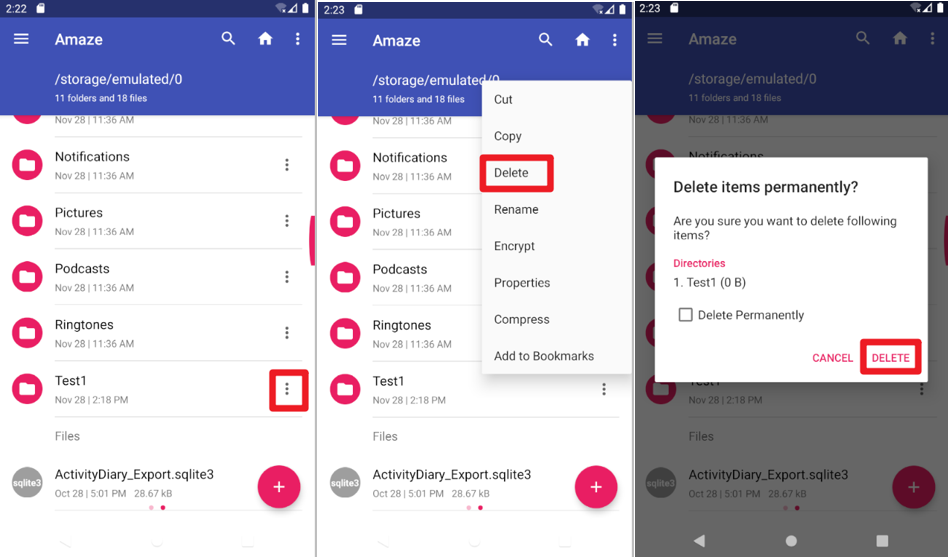
Delete Folder Screenshot
@precondition(lambda self:  self._files.get_all_data() and
                            d(resourceId="com.amaze.filemanager:id/sd_main_fab").exists() and
                            not d(resourceId="com.amaze.filemanager:id/action_mode_close_button").exists())
@rule()
def del_file_should_disappear(self):
    d.swipe_ext("down", scale=0.9)
    d(description="Navigate up").click()
    d(resourceId="com.amaze.filemanager:id/design_menu_item_text", textContains="Internal Storage").click()
    file_name = self._files.get_random_data()
    d(scrollable=True).scroll.to(resourceId="com.amaze.filemanager:id/firstline", text = file_name)
    selected_file = d(resourceId="com.amaze.filemanager:id/firstline", text = file_name)
    selected_file_name = selected_file.get_text()
    selected_file.right(resourceId="com.amaze.filemanager:id/properties").click()
    d(text="Delete").click()
    d(resourceId="com.amaze.filemanager:id/md_buttonDefaultPositive").click()
    self._files.delete(selected_file_name)
    d.swipe_ext("down", scale=0.9)
    d(resourceId="com.amaze.filemanager:id/home").click()
    d(scrollable=True).scroll.to(resourceId="com.amaze.filemanager:id/firstline", text=file_name)
    assert not d(text=selected_file_name).exists()