Input Manager
This section aims to explain the strategies in Kea and the design and implementation of the input controller class InputManager.
Functional Design and Implementation
The InputManager class is the control class for event generators. It is responsible for starting and stopping event generation and generating and sending events based on specified input strategies, supporting random exploration strategies, main path guidance strategies, and LLM strategies. This class provides a flexible event management mechanism, allowing users to customize event generation strategies and dynamically adjust event sending based on the application’s operational state. The main methods included in InputManager are:
Get the exploration strategy chosen by the current test user.
Add events to the device’s execution event list for execution.
Start generating events for testing using the current exploration strategy.
Stop generating events and end this test.
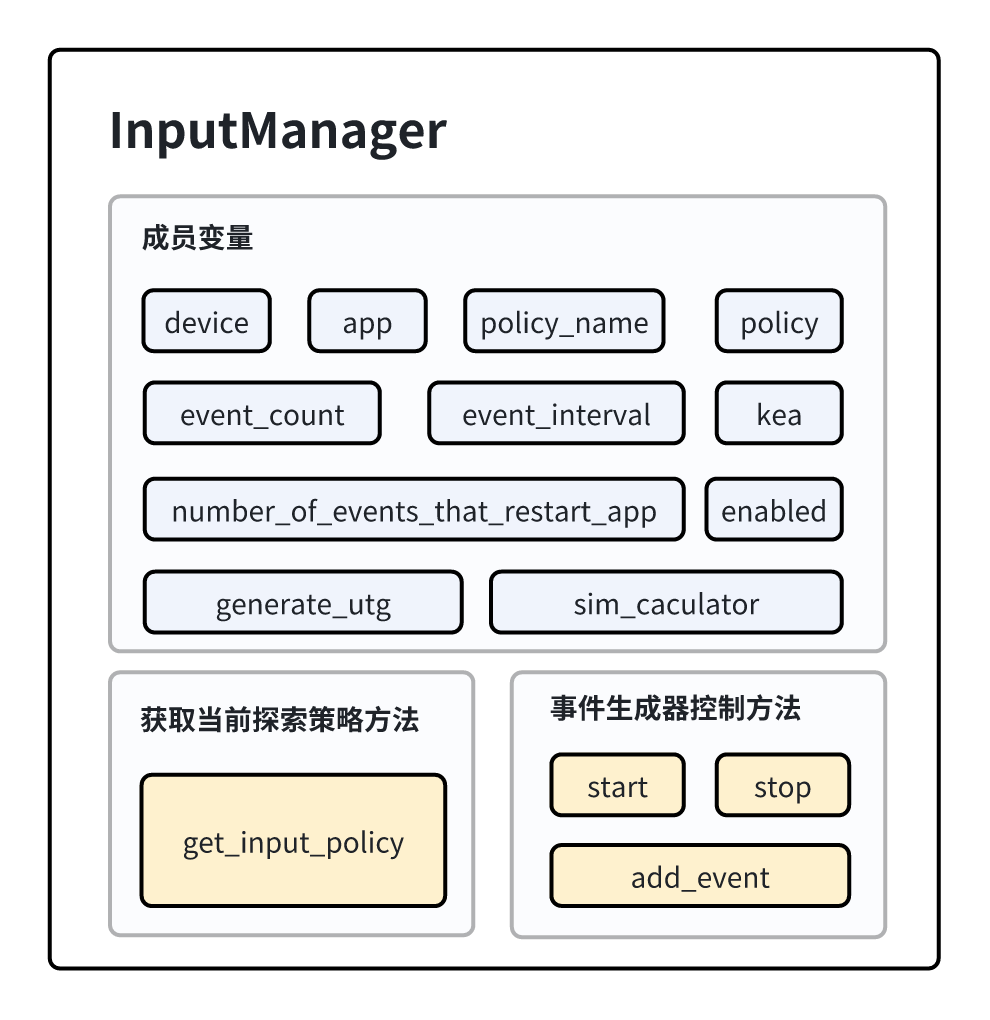
Composition of the InputManager Class
Note
To facilitate readers’ understanding, the provided code snippets in this paper are simplified versions that abstract and demonstrate only the core processes; the actual code may not completely match the reference code.
Class Attributes
DEFAULT_POLICY: Default input strategy name.RANDOM_POLICY: Random input strategy name.DEFAULT_EVENT_INTERVAL: Default event interval time.DEFAULT_EVENT_COUNT: Default number of events to generate.DEFAULT_TIMEOUT: Default timeout.DEFAULT_DEVICE_SERIAL: Default device serial number.DEFAULT_UI_TARPIT_NUM: Default number of UI tarpit traps.
Data Structures in the InputManager Class
device
device is an object of Device, used to record the information of the currently tested device for subsequent interaction operations with the device.
app
app is an object of App, used to record information about the mobile application currently being tested.
policy & policy_name
policy_name is a string type used to store the name of the exploration strategy chosen by the user. policy is an object of the specific exploration strategy class.
event_count & event_interval & number_of_events_that_restart_app
These three member variables are all integer types. event_count records the count of events generated from the start of the test to now; event_interval records the pause time set by the user between two events; number_of_events_that_restart_app indicates how many events need to occur before the application is restarted.
kea
kea is an object of the Kea class, used to extract recorded data from the Kea class during the event generation process to complete the property testing of the application.
enabled
enabled is a boolean type used to record whether the current event generator needs to continue generating events, with a default value of True.
generate_utg
generate_utg is a boolean type used to record whether the user has set a parameter for generating UI transition graphs, facilitating the determination of whether a UI transition graph should be generated during the event generation process.
sim_caculator
sim_caculator is an object of Similarity, used to calculate the similarity between the previous interface state and the current interface state.
Member Methods in the InputManager Class
Constructor
The __init__ method is used to initialize an InputManager instance, setting the basic parameters for event sending and initializing the corresponding input strategy based on the provided strategy name.
- Parameters:
device: Device instance representing the target device.app: App instance representing the target application.policy_name: String specifying the strategy name for event generation.random_input: Boolean indicating whether to use random input.event_interval: Event interval time.event_count: Number of events to generate, defaults toDEFAULT_EVENT_COUNT.profiling_method: Analysis method used for performance profiling.kea: Kea instance used for property testing.number_of_events_that_restart_app: Number of events after which the application needs to be restarted.generate_utg: Boolean indicating whether to generate UTG.
- Core Process:
Initialize the logger.
Set the event sending parameters.
Initialize the input strategy based on the strategy name.
Set the similarity calculator.
Method to Obtain Exploration Strategy
get_input_policy
The get_input_policy method instantiates the corresponding exploration strategy object based on the policy_name chosen by the user. The instantiated object is stored in the policy member variable. Supported strategies include: random exploration strategy, main path guidance strategy, and LLM strategy.
- Parameters:
device: Device instance.app: App instance.
- Return:
The strategy instance used in this test.
- Core Process:
Determine which input strategy to use based on the strategy name.
Create the corresponding input strategy instance.
def get_input_policy(self, device, app):
    if self.policy_name == POLICY_NONE:
        input_policy = None
    elif self.policy_name == POLICY_GUIDED:
        input_policy = GuidedPolicy(device,app,self.kea,self.generate_utg)
    elif self.policy_name == POLICY_RANDOM:
        input_policy = RandomPolicy(device, app, self.kea, self.number_of_events_that_restart_app, True, self.generate_utg)
    elif self.policy_name == POLICY_LLM:
        input_policy = LLMPolicy(device, app, self.kea, self.number_of_events_that_restart_app, True, self.generate_utg)
    else:
        input_policy = None
    return input_policy
Control Methods for Event Generators
start
The start method is used to start the selected exploration strategy.
- Core Process:
Log the start of event sending.
Start sending events based on the input strategy.
Handle keyboard interrupts to ensure graceful exit.
def start(self):
    try:
        if self.policy is not None:
            self.policy.start(self)
    except KeyboardInterrupt:
        pass
    self.stop()
stop
The stop method is used to end the exploration process.
- Core Process:
Terminate event sending.
Clean up resources related to event sending.
Log the stop of event sending.
def stop(self):
    self.enabled = False
add_event
The add_event method adds an event to the event list and sends it to the mobile device.
- Parameters:
event: The event to be added, which should be a subclass of AppEvent.
- Core Process:
Add the event to the event list.
Create an event log recorder.
Send events to the device based on the event interval time.
def add_event(self, event):
    if event is None:
        return
    self.events.append(event)
    event_log = EventLog(self.device, self.app, event)
    event_log.start()
    while True:
        time.sleep(self.event_interval)
        if not self.device.pause_sending_event:
            break
    event_log.stop()
Usage
The main function of the InputManager class is to control the event generator and manage event sending during the application’s operation. Users can initialize an InputManager instance through the constructor and set corresponding parameters, such as the test device, the application being tested, strategy name, etc. Then, they can start the event generator using the start method. Single events can be added using the add_event method and sent. The stop method is used to stop generating events.