Configuring the Android Environment Using Android Studio
Important
Prerequisite: Install Android Studio on your computer.
You can download Android Studio at https://developer.android.com/studio.
Hint
Kea relies on the adb command to interact with Android devices. It is important to ensure that the ADB (Android Debug Bridge) command is available. The following tutorial will help you set up the entire Android SDK toolkit. But remember, just adding the adb command to your PATH is enough.
1. Setting Up Command-Line Tools (adb)
MacOS and Linux
After installing Android Studio on your computer, you need to add the Android SDK to your PATH environment variable so that it takes effect in the terminal.
For more details, see Android Studio Documentation: Environment Variables.
If you are using zsh or bash, use the EXPORT command to set the ANDROID_HOME environment variable. The ANDROID_HOME environment variable should point to your SDK installation path. The default path is /usr/Library/Android/sdk/. You can check your installation path via Android Studio -> Settings -> Languages & Frameworks -> Android SDK.
In this window, check SDK Tools and install Android SDK Platform Tools.

Example of Android SDK Path in Android Studio
Then, add the path to your .bashrc or .zshrc file.
export ANDROID_HOME="/usr/.../Library/Android/sdk/"
# export 安卓安装目录中的所有命令。
export PATH="$ANDROID_HOME/emulator:$ANDROID_HOME/tools:$ANDROID_HOME/cmdline-tools/latest/bin:$ANDROID_HOME/tools/bin:$ANDROID_HOME/cmdline-tools/latest:$ANDROID_HOME/platform-tools:$PATH"
Run source on the shell configuration file to activate the changes.
Important
text
Type adb in the terminal to check if the setup was successful.
Windows
After installing Android Studio on your computer, you need to add the Android SDK to your PATH environment variable so that it takes effect in the terminal.
If you are using zsh or bash, use the EXPORT command to set the ANDROID_HOME environment variable. The ANDROID_HOME environment variable should point to your SDK installation path. The default path is C:\Users\usr_name\AppData\Local\Android\Sdk. You can check your installation path via File -> Settings -> Languages & Frameworks -> Android SDK.
In this window, check SDK Tools and install Android SDK Platform Tools.
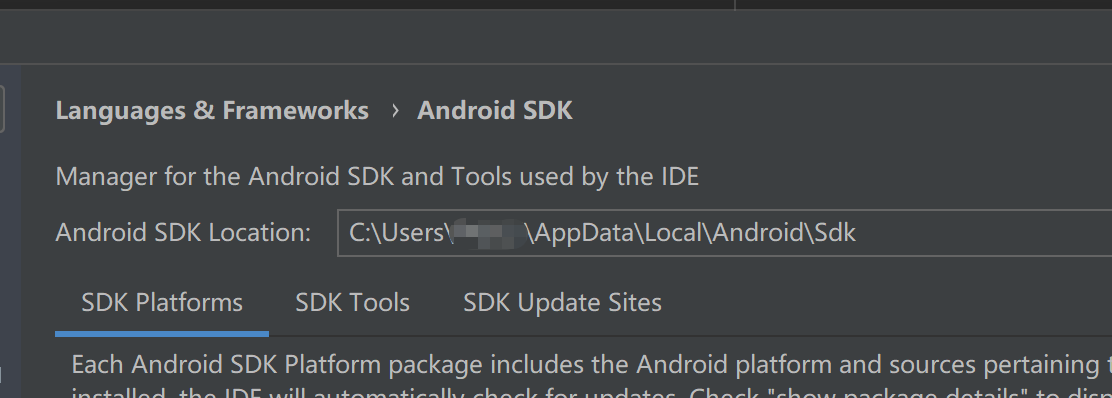
Example of Android SDK Path in Android Studio
Then, add the following path to the PATH variable. See How to Add PATH Environment Variable in Windows.
ANDROID_HOME:
C:\Users\usr_name\AppData\Local\Android\Sdk

PATH:
%ANDROID_HOME%\platform-tools