LLMPolicy
LLMPolicy类是使用LLM(Large Language Model)在检测到UI陷阱时生成输入事件的核心类。 主要负责在应用状态空间中遇到难以探索的UI状态时,利用LLM生成输入事件以增强功能场景覆盖。 该类提供了完整的LLM辅助事件生成策略的事件生成过程。 LLMPolicy所包含的主要方法有:
根据当前状态生成一个LLM辅助的随机事件。
根据配置重启或重新安装应用。
在满足预条件的情况下,根据随机性决定是否检查性质。
LLM辅助事件生成策略的介绍
LLM辅助事件生成策略是一种结合了大型语言模型的策略,它可以在应用的GUI测试中遇到难以通过传统随机策略探索的状态时,利用LLM生成更有效的输入事件。 这种策略特别适用于那些需要深入探索应用状态空间或需要优化测试覆盖率的场景。
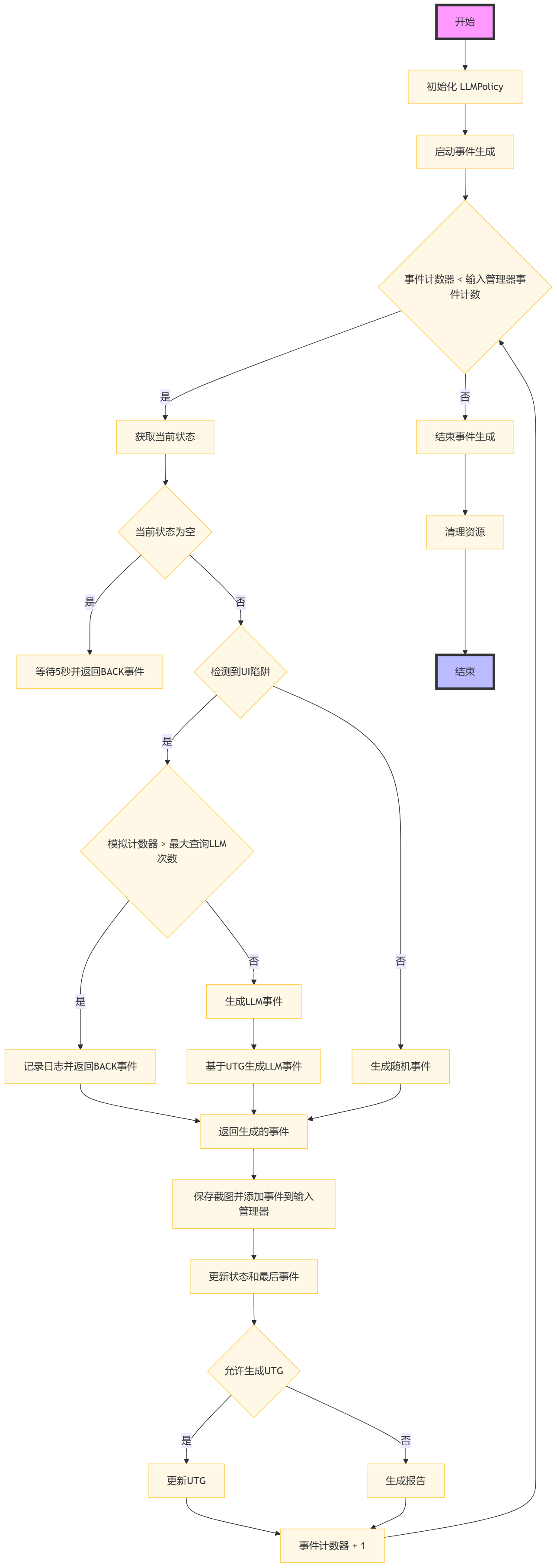
LLM辅助事件生成策略的流程图
具体执行步骤如下:
步骤1:开始执行 LLMPolicy 类的事件生成过程。
步骤2:初始化 LLMPolicy 实例,设置日志记录器、动作历史记录等。
步骤3:启动事件生成循环,直到输入管理器的事件计数结束或条件不再满足。
步骤4:检查事件计数器是否小于输入管理器设定的事件计数。
步骤5:如果事件计数器小于输入管理器设定的事件计数,获取当前应用状态。
步骤6:判断当前状态是否为空。
步骤7:如果当前状态为空,等待5秒并返回一个名称为”BACK”的键事件。
步骤8:如果当前状态不为空,检查是否检测到UI陷阱。
步骤9:如果检测到UI陷阱,检查模拟计数器是否超过了最大查询LLM次数。
步骤10:如果模拟计数器超过了最大查询LLM次数,记录日志并返回一个名称为”BACK”的键事件。
步骤11:如果模拟计数器未超过最大查询LLM次数,生成一个LLM事件。
步骤12:如果未检测到UI陷阱,生成一个随机事件。
步骤13:基于当前用户触发的事件(UTG)生成LLM事件。
步骤14:返回生成的事件,该事件将被用于与应用的交互。
步骤15:保存截图并将生成的事件添加到输入管理器。
步骤16:更新当前状态和最后事件。
步骤17:检查是否允许生成UTG。
步骤18:如果允许生成UTG,更新UTG。
步骤19:生成报告,包括所有状态和触发的bug信息。
步骤20:事件计数器加1,回到步骤4继续循环。
步骤21:如果事件计数器达到输入管理器设定的事件计数,结束事件生成循环。
步骤22:清理资源,结束 LLMPolicy 类的事件生成过程。
LLM辅助事件生成策略的伪代码
\(\textbf{Algorithm:} LLM-Assisted Event Generation\)
\(\textbf{Input:} None\)
\(\textbf{Output:} Bug Report\)
 1Function LLM_Assisted_Event_Generation(policy_params)
 2    Initialize policy with device, app, kea, and other parameters
 3    Set event_count to 0
 4
 5    While input_manager is enabled and event_count < max_events
 6        If device needs initialization
 7            Perform device initialization
 8
 9        Determine current application state
10        If app is not running
11            Start the app
12        ElseIf app is in background
13            Bring app to foreground
14        Else
15            Generate LLM prompt based on current state and history
16            Query LLM for next action
17            If LLM response indicates action
18                Perform action and update state
19            Else if LLM indicates text input
20                Get text from LLM and perform text input action
21            End If
22        End If
23
24        If event_count is a multiple of restart_threshold
25            Restart the app if necessary
26
27        Save screenshot and add event to input_manager
28        Increment event_count
29    End While
30
31    Generate final bug report if any issues found
32    Clean up policy resources
33End Function
LLMPolicy类中的数据结构
event_count
event_count整型,记录了已经生成的事件数量。
number_of_events_that_restart_app
number_of_events_that_restart_app整型,记录了在重启应用前需要生成的事件数量。
clear_and_restart_app_data_after_100_events
clear_and_restart_app_data_after_100_events布尔型,指示是否在100次事件后清除并重启应用数据。
restart_app_after_check_property
restart_app_after_check_property布尔型,指示在检查性质后是否重启应用。
_action_history
_action_history列表,记录了动作历史。
_all_action_history
_all_action_history集合,记录了所有动作历史记录。
_activity_history
_activity_history集合,记录了活动历史记录。
from_state
from_state对象,记录了起始状态。
task
task字符串,记录了LLM的任务描述。
LLMPolicy类中的成员方法
启动事件生成的方法
start
start 方法用于启动事件生成过程。
- 参数:
input_manager: InputManager的实例。
- 核心流程:
初始化事件计数器和输入管理器。
循环生成事件直到达到输入管理器设定的事件计数或条件不再满足。
根据当前状态和LLM的指导生成事件。
将生成的事件添加到输入管理器中并更新设备状态。
处理异常情况并在每次事件后增加事件计数器。
 1 def start(self, input_manager):
 2     self.event_count = 0
 3     self.input_manager = input_manager
 4     while self.event_count < input_manager.event_count:
 5         event = self.generate_event()
 6         self.input_manager.add_event(event)
 7         self.event_count += 1
 8
 9 def generate_event(self):
10     if not self.from_state:
11         self.from_state = self.device.get_current_state()
12     if self.event_count == 0:
13         event = KillAppEvent(app=self.app)
14     elif self.event_count == 1:
15         event = IntentEvent(self.app.get_start_intent())
16     else:
17         event = (self.generate_llm_event()
18                 if input_manager.sim_calculator.detected_ui_tarpit(input_manager)
19                 else self.generate_random_event_based_on_current_state())
20     return event
生成LLM事件的方法
generate_llm_event
generate_llm_event 方法用于生成一个LLM辅助的事件。
- 参数:
无
- 返回:
生成的事件对象。
- 核心流程:
检查是否需要运行初始化器并获取当前应用状态。
根据事件计数和设置决定是否重启应用或清除并重新安装应用。
检查是否有满足前提条件的规则,并根据随机性决定是否检查性质。
生成基于LLM的事件。
 1 def generate_llm_event(self):
 2     if self.event_count == START_TO_GENERATE_EVENT_IN_POLICY or isinstance(self.last_event, ReInstallAppEvent):
 3         self.run_initializer()
 4         self.from_state = self.device.get_current_state()
 5     if not self.from_state:
 6         time.sleep(5)
 7         return KeyEvent(name="BACK")
 8
 9     if self.event_count % self.number_of_events_that_restart_app == 0 and self.clear_and_reinstall_app:
10         return ReInstallAppEvent(self.app)
11
12     rules_to_check = self.kea.get_rules_whose_preconditions_are_satisfied()
13     if rules_to_check and random.random() < 0.5:
14         self.check_rule_whose_precondition_are_satisfied()
15         if self.restart_app_after_check_property:
16             return KillAppEvent(self.app)
17
18     event = self.generate_llm_event_based_on_utg()
19
20     if isinstance(event, RotateDevice):
21         event = RotateDeviceToLandscapeEvent() if self.last_rotate_events == RotateDeviceToPortraitEvent() else RotateDeviceToPortraitEvent()
22         self.last_rotate_events = event
23
24     return event
生成基于UTG的LLM事件的方法
generate_llm_event_based_on_utg
generate_llm_event_based_on_utg 方法用于基于当前UTG生成一个LLM辅助的事件。
- 参数:
无
- 返回:
生成的事件对象。
- 核心流程:
获取当前应用状态。
如果应用不在活动堆栈中,尝试启动应用。
如果应用在活动堆栈中但不在前台,尝试返回前台。
如果应用在前台,根据LLM的指导选择下一步操作。
 1 def generate_llm_event_based_on_utg(self):
 2     current_state = self.from_state
 3     if current_state.get_app_activity_depth(self.app) < 0:
 4         start_app_intent = self.app.get_start_intent()
 5         return IntentEvent(intent=start_app_intent) if not self._event_trace.endswith(EVENT_FLAG_START_APP) else None
 6
 7     elif current_state.get_app_activity_depth(self.app) > 0 and self.__num_steps_outside > MAX_NUM_STEPS_OUTSIDE:
 8         go_back_event = KeyEvent(name="BACK") if self.__num_steps_outside <= MAX_NUM_STEPS_OUTSIDE_KILL else IntentEvent(self.app.get_stop_intent())
 9         return go_back_event
10
11     action, _ = self._get_action_with_LLM(current_state, self.__action_history, self.__activity_history)
12     return action if action else self.__random_explore_action()
13
14 def __random_explore_action(self):
15     if self.__random_explore:
16         return random.choice(self.__all_action_history)
17     # If couldn't find an exploration target, stop the app
18     stop_app_intent = self.app.get_stop_intent()
19     return IntentEvent(intent=stop_app_intent)
查询LLM的方法
_query_llm
_query_llm 方法用于向LLM查询以生成事件。
- 参数:
prompt: 提供给LLM的提示文本。
model_name: 使用的LLM模型名称,默认为”gpt-3.5-turbo”。
- 返回:
LLM的响应文本。
- 核心流程:
设置LLM客户端。
发送提示文本到LLM。
接收并返回LLM的响应。
1 def _query_llm(self, prompt, model_name):
2
3     client = OpenAI()
4     response = client.chat.completions.create(messages=[{"role": "user", "content": prompt}],
5     model=model_name, timeout=30)
6     return response.choices[0].message.content
获取动作与LLM交互的方法
_get_action_with_LLM
_get_action_with_LLM 方法用于获取基于LLM的下一个动作。
- 参数:
current_state: 当前应用状态。
action_history: 动作历史记录。
activity_history: 活动历史记录。
- 返回:
选中的动作和候选动作列表。
- 核心流程:
构建包含任务描述、当前状态和历史记录的提示文本。
向LLM查询并接收响应。
解析响应以获取动作索引。
根据索引选择动作并更新历史记录。
1def _get_action_with_LLM(self, current_state, action_history, activity_history):
2
3     prompt = self._build_prompt(current_state, action_history, activity_history)
4     response = self._query_llm(prompt)
5     action_idx = self._parse_response(response)
6     return self._select_action(action_idx, current_state, action_history, activity_history)